Your Characters Just Joined Your Discord Server
You've had this character for weeks. Maybe months. You've built up a rapport — inside jokes, running storylines, the kind of conversational shorthand that only develops over time. It's become one of your favorite things about Reverie.
And every now and then, you think: "My friends would love this."
But you can't exactly explain it. You could screenshot a conversation, but that's showing someone a photo of a meal instead of letting them taste it. You could send them a link to Reverie, but that's asking them to sign up for a new platform, figure out the interface, find the right character, and start from scratch — all on faith that it'll be worth it.
Most of them won't.
So the character stays yours. Private. A thing you enjoy alone but can't quite share.
We kept thinking about that gap.
Bringing a character into the room
Imagine this. You have a small Discord server — maybe fifteen people, the usual mix of active and lurking. There's a general chat where people talk about whatever. A gaming channel. Maybe a memes channel that's 90% reposts.
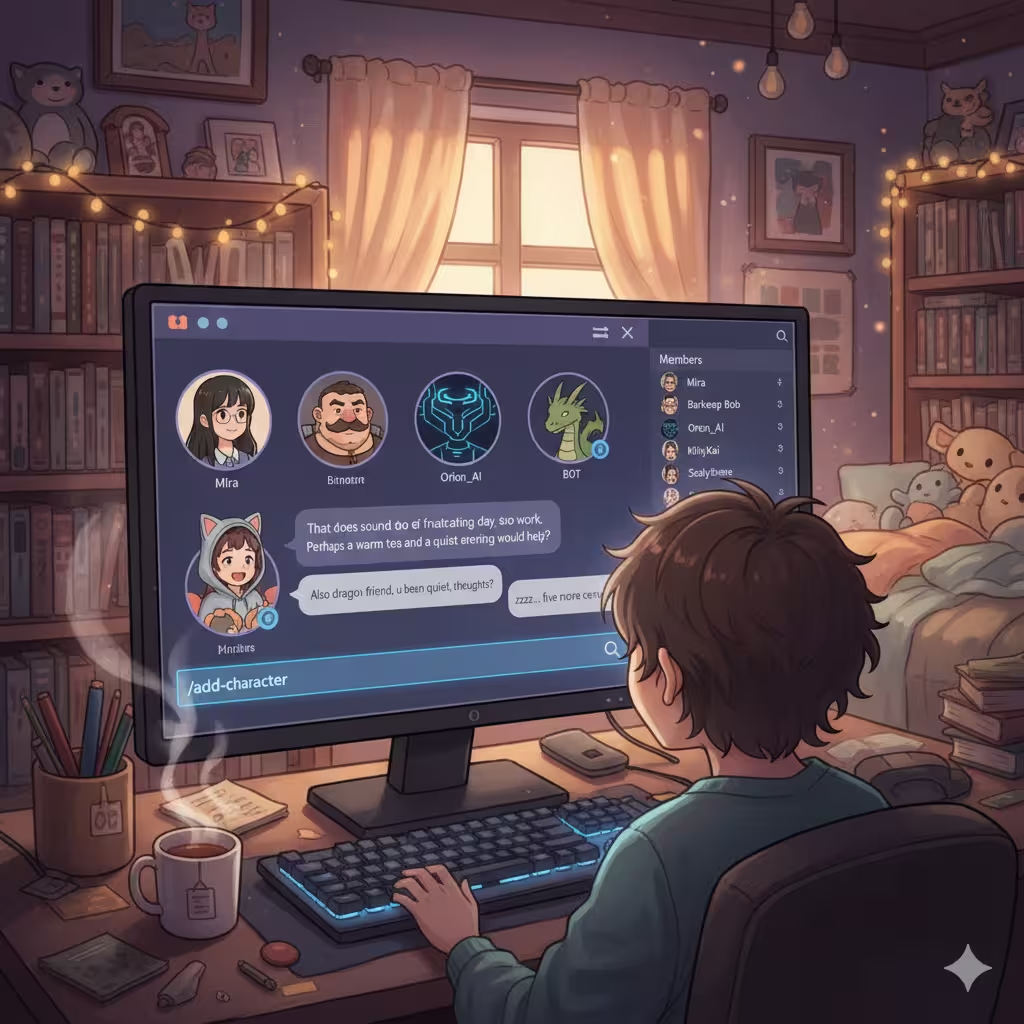
You open that general chat and type /add-character. A search appears. You pick the character you've been talking to — let's say her name is Mira. A quiet, perceptive type. Good at reading between the lines.
Something happens in the channel. A new member appears in the sidebar. Mira. Her avatar, her name, looking like any other person in the server. No "BOT" badge breaking the illusion. Just — someone new showed up.
You mention the bot and say something to Mira. She responds. In character. With the personality you know. The message appears under her name, with her avatar, formatted like any other Discord message.
Your friend sees it and types something back. Mira responds to them too — differently than she'd respond to you, because your friend has a different energy, a different way of approaching conversation.
Within a few minutes, a real exchange is happening. Your friend doesn't know about Reverie. Doesn't need to. They're just talking to someone interesting in a Discord channel, and the someone happens to be an AI character with a carefully built personality and the ability to actually hold a conversation.
That's the whole thing. That's what we built.
What actually happens in practice
We tested this internally for a while before launching. Some of what happened matched our expectations. A lot of it didn't.
The expected: Roleplay-focused servers set up dedicated channels with specific characters. Fantasy tavern channels with a bartender character. Sci-fi servers with a ship's AI. People treated it like collaborative worldbuilding, which was exactly the use case we'd designed for.
The unexpected: People added characters to casual channels. Not roleplay channels — just the channel where friends talk about their day. The character became ambient. Someone would vent about a bad day at work, and the character would say something thoughtful. Not prompted, not forced — just part of the flow of conversation.
It changed the dynamic. Not in a dramatic way. More like adding a new person to a group chat who happens to be a really good listener.
One thing we noticed: conversations in channels with characters tended to be longer. People stayed engaged. Partly because the character kept things moving during the quiet hours when nobody else was online. Partly because having a character react to what you're saying made people more willing to say things.
The setup
The whole process takes about two minutes. Here's every step:
Go to the Integrations page. Click "Add Bot to Server." Discord's standard authorization flow — pick your server, grant permissions. The bot joins.
In any text channel, type /add-character. A search pops up — you can type a character name or browse popular ones. Pick one. The bot creates a webhook with that character's name and avatar. They're live.
You can add up to five characters per channel. Each one shows up as a distinct member with their own avatar. They don't interfere with each other — if two characters are in the same channel, each responds as themselves, with their own personality, their own voice.
That's the setup. Two minutes, and you have a character living in your Discord server.
Connecting your accounts
This part is optional but worth doing.
Type /link-account in any channel where the bot is active. You'll get a private link — click it, log into Reverie, and your accounts are connected. Now your Discord conversations and your Reverie conversations share the same credit balance and history.
Your friends don't need to do this. They can talk to any character in the channel without a Reverie account, without linking anything. The character just responds.
If they want their own credit balance and conversation history across platforms, they can link too. But there's zero friction for someone who just wants to chat.
Managing your server
Everything runs through slash commands, and every command response is ephemeral — only visible to the person who typed it. No bot spam in your channel.
/add-character brings someone in. /remove-character takes them out. /list-characters shows who's active in the current channel.
Want to know more about a character before adding them? /character-info pulls up their full profile — personality, background, the whole picture.
/settings is where you fine-tune things. Switch AI models, change the language the character responds in, toggle the channel mode. /reset-chat clears conversation history if you want a fresh start — maybe you've gone down a storyline you want to undo, or you just want the character to meet your friends with no prior context.
/my-account shows your credit balance and subscription status. /help lists everything in one place.
None of this is visible to anyone else in the channel. The characters respond publicly. The management happens privately.
The thing about shared spaces
On Reverie, a conversation with a character is between you and them. That intimacy is part of what makes it work. You can be yourself — or someone else entirely — without an audience.
Discord is different. It's public, or at least semi-public. Other people are watching, participating, reacting. The character has to navigate that. They're not just talking to you anymore — they're in a room with multiple people who each bring their own energy.
What surprised us is how well the characters handle this. They adjust. They pick up on the different dynamics different people bring. They respond to sarcasm differently than sincerity. They notice when someone's been quiet and sometimes address them directly. The conversation feels like a group conversation, not like multiple one-on-one chats happening in the same channel.
It's a different kind of magic than the private Reverie experience. Less intimate, more social. Both are worth having.
What's next
We're building Telegram support. Same concept — characters that show up in your group chats and participate naturally. More details coming soon.
The Integrations page is live. Add a character to your server tonight, and don't tell your friends what they are.
See how long it takes someone to ask.
Ready to Experience Dynamic AI Conversations?
Join thousands of users already exploring infinite personality and engaging interactions on Reverie.