Ensembles: A Whole Cast, and You Choose Who You Are
Reverie Team
•
On this page
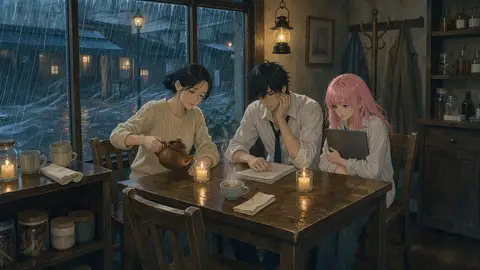
A typhoon has knocked the power out on the old street. Lin Wan's café is the only place still lit, by candles. Gu Huaizhi has just walked in from court, soaked, carrying the file of the first case he ever lost. Momo, just off stream, is curled up in a corner with a dead laptop and a phone at 3%. Nobody can leave, and the rain won't stop until dawn.
There's an empty chair at the table. Today you get to decide who sits in it.
The trouble with an empty group chat
Group chat on Reverie has always let you put several characters in one room. What it never did was tell them why they were there.
Start a group with Lin Wan, Gu Huaizhi and Momo and you get three polite hellos. Then the work begins: you explain where everyone is, how they know each other, what just happened, why tonight matters. Ten messages in, you're still writing stage directions, and the story you came for hasn't started.
There was a second problem, and a user put it better than we could. Their favourite card cast them as one hero, and they wanted to play his rival. A persona didn't fix it: the cast still treated them as the newcomer the card was written for, just under another name.
Ensembles answer both. The scene is set before you arrive. And when you join, you choose who you are.
What an ensemble is
An ensemble is a group chat someone has already set up. It has:
A cast of two to five characters. The first one is the Host: it anchors the chat and is always voiced by the AI. Every member can carry a short note on their part in this particular story, such as "the café owner who knows everyone's secrets" or "the lawyer who just lost his first case".
A setup: where they are, what just happened and what's at stake.
A story goal, if the creator wrote one: "Before dawn, get each of these strangers to say why they didn't want to go home tonight." The cast steers toward it, but they never reach it on your behalf, and if you take the story somewhere else, they follow you.
An opening, if the creator wrote one: the first scene, shown as the first message of every new chat.
Related posts
Roles: who you can be when you join.
The setup isn't a one-off introduction. It travels with every turn of the chat, so the cast still knows why they're stuck in the café fifty messages later, and who everyone is to each other.
Choose who you are
Open an ensemble and you'll see Choose your role. Depending on what the creator allowed, there are up to three kinds of seat.
Play yourself. Join with one of your own personas. The cast meets you as that persona, and the setup gives them the situation you've walked into.
Take the preset persona. Creators can write a ready-made character for players, marked Preset. In the café, that's Ah Yuan, a delivery rider stranded by the typhoon with a bag of cold takeaway. Pick Play Ah Yuan and the persona is copied into your personas, once per ensemble, and selected for you when the chat opens. The copy sits with your personas for the host character. Edit it and it's yours to keep; leave it untouched and it's tidied away when you delete the last chat that used it.
Step into a character. Any cast member the creator marked playable can be yours, shown with a Playable badge in the cast list. Pick Play Gu Huaizhi and the AI stops voicing him. You write his lines, and Lin Wan and Momo answer you as the lawyer who just lost his first case, not as a stranger who happens to be sitting in his chair.
The host can never be played: the chat hangs off the host, and the AI needs someone to voice. A creator can turn off joining as yourself, but then must mark at least one character playable, so there's always a seat for you.
Starting one, step by step
1. Find one. Ensembles are in a few places:
Home has an Ensembles row with the most-played public ones. See all opens the full list, sorted by Popular or New, with Mine for the ones you made.
Labs has an Ensembles tile that opens the same list.
In a new chat, the Group Chat button in the header opens the member picker. Above the members it lists the Ensembles that character hosts, plus a Create ensemble shortcut.
Every public ensemble has its own page at , with its setup, goal, Opening scene and cast, that you can send to friends who aren't on Reverie yet.
2. Read the page. It shows the setup, the goal and the Cast, each with their role in this story and the host marked Host.
3. Choose your role and press Start chat. The chat opens on the host's chat page with the full cast already in the room. Before your first message you'll see the title, the setup, the goal, a line telling you who you are ("You play Gu Huaizhi" or "You join as yourself"), and the opening scene, if there is one.
4. Write your first line. From here it's a group chat like any other.
One thing to know: the ensemble's setup only holds for the cast it was written for. If you add or remove someone, or switch roles, before your first message, the chat becomes an ordinary group chat.
When you play one of the cast
Here's what's different in a chat where you play a cast member:
The AI never writes your character. It doesn't give him lines, actions, thoughts, feelings or decisions. It reacts to what he has done and stops where he would act. If everyone else leaves the room, the AI still won't narrate his inner life: it describes the rain, a car passing outside, someone coming back in, and leaves his next move to you.
Their card becomes your persona. Who he is, his personality, how he looks: that's what the cast knows about the person they're talking to. Notes in the other cards written for a generic player are set aside, so nobody mistakes Gu Huaizhi for "you, the newcomer".
Memory is off. Characters keep long-term memories about you, the real you. A chat where you're someone else would fill those with the wrong person, so in this chat they neither read your saved memories nor learn anything new. Conversation summaries still keep the story going, and they record your lines as his.
The chat shows who you are. The persona picker next to the message box becomes a Playing Gu Huaizhi tag, your messages carry his name with a mask icon, and the chat list labels the chat the same way.
The helpers follow along. Reply suggestions are drafted in his voice. Mentions and directed replies only offer the characters the AI plays.
Some tools step aside. Voice calls, and the tools that compare or enhance the first reply, are hidden in these chats, because they're built around talking to you as yourself.
It carries over. Share the chat, fork it or export it, and it still knows who you played. Turn it into a novel and he's the protagonist.
You don't need an ensemble to do this, either. In any new group chat, tap the mask on a member in the picker to play them yourself. The AI voices everyone else.
Let the cast open the scene
Not every ensemble has a written opening, and sometimes you want a different one. In a new chat, the sparkle button beside the message box is Generate First Message. It works in ensemble chats too.
Give it a direction ("Momo's phone finally dies mid-sentence") or leave it empty for a random scene, then press Generate. In an ensemble chat, the members the AI plays open the scene, with the ensemble's setup as background. If you're playing a cast member, the opening never speaks for them and doesn't read your memories. Edit the result if you like, press Apply, and it becomes the chat's first message in place of the written opening. If you'd rather write the opening yourself, Use Directly posts your text as it is.
The setup only comes along while the cast and role match the ensemble exactly. Change either one and the generator writes an opening for a plain group chat.
Coming back to a story
Every chat you start from an ensemble is listed on its page under Continue your story: your five most recent ones, each with the role you played ("As Gu Huaizhi", "As yourself"). Pick up where you left off, or start again in another seat. The same night in the café reads very differently from Gu Huaizhi's chair than from Ah Yuan's.
If the creator later deletes the ensemble, chats already started from it stay as they are.
Making your own
Create ensemble opens the editor, with a preview of the card beside it so you can see how it will look in the list while you write. Most of it is one decision after another:
Choose characters: two to five, your own or public ones. The first one you pick hosts; Make host changes that. Give each one a short note on their part in this story.
Tick Players can play this character on the ones a player may take over.
Write the Story: a Title, the Setup, an optional Story goal and an optional Opening.
Under Players, decide whether Players can join as themselves. If they can, you can also give them a Preset persona: a name, a gender and a description. Fill from my personas starts it from one you already have.
Pick Who can see it: Public (listed for everyone), Unlisted (anyone with the link, kept out of search) or Private (just you).
Short on ideas? Once you've picked at least two characters, Write it with AI drafts the title, setup, goal, opening, each character's role and which roles are playable, and a preset persona if players can join as themselves. Give it an idea of your own or leave it blank. It writes in your language, asks before replacing anything you've written, and everything stays editable. It uses credits like the other AI tools.
A few rules keep shared ensembles playable:
A public or unlisted ensemble can only include public characters and your own unlisted ones, since everyone who opens it has to be able to chat with the whole cast. A private ensemble can use your private characters too.
Public and unlisted ensembles are translated into every language Reverie speaks, so a cast you write in English can be played in Japanese. You always see the version you wrote, and an edit shows up right away while its translations catch up.
An ensemble with an 18+ character in it is 18+ too, shown only to people who have 18+ content turned on.
Chats people have already started keep their cast if you edit the ensemble later.
The chat count on your card goes up each time someone starts a chat from it. Your own chats don't count, so Popular reflects other people playing.
Three setups to try
Need a spark? Here are three you could build tonight with characters of your own.
The last ferry. A ferry pilot, a retired magician and a runaway heiress miss the last boat off a small island. Goal: "Find out what the heiress is running from before the first ferry arrives." The pilot hosts; the magician and the heiress are playable, and the preset persona is a ticket clerk closing up. Opening: The departure board flickers to CANCELLED. Outside, the harbour lights go out one by one.
The bake-off final. Three finalists, one oven that keeps tripping the fuse, and a judge who has never given a perfect score. Goal: "Someone earns that perfect score, and it doesn't have to be the best baker." The judge hosts; every finalist is playable.
The night shift at the museum. A security guard, a restorer working late on a damaged portrait, and the portrait's subject, who only talks after midnight. Goal: "Learn who damaged the painting, and why the subject won't say." Joining as yourself works well here: a visitor who fell asleep in the gallery.
Writing a premise that plays well
The cast reads the setup before every reply, so it's worth getting right:
One place, one moment. "Snowed in at the inn on the night of the wedding" gives the cast something to react to. "A fantasy kingdom in turmoil" doesn't. The setup has room for 2,000 characters, but a strong one is often three or four sentences.
Give every character a reason to be there, and something to want. Characters who want different things make scenes without your help.
Write about the cast, not about "you". The player may join as themselves, as the preset persona or as one of the cast, so a setup that says "you walk in" fits only one of those seats. Let the player's role come from what they pick.
Make the goal an open question. "Find out who is lying before dawn" gives the chat a direction. "The butler confesses" ends it. The cast will steer toward the goal but never close it for the player, so leave room for the answer.
Keep role notes to a line. Everyone sees them, players included.
Mark the playable roles that have something to do. A character with a secret, a choice or a deadline is fun to play. One who only reacts is better left to the AI.
Tell the preset persona why they're here. "A delivery rider stranded by the typhoon" gives a player something to work with. "A stranger" doesn't.
Pull up a chair
The candles in the café are still lit and the tea is still warm. Pick a seat, or set a table of your own.
·
Ready to Experience Dynamic AI Conversations?
Join thousands of users already exploring infinite personality and engaging interactions on Reverie.